My Neovim journey
NOV 28, 2026 • 10 MIN. READ •
I'm officially releasing my Neovim config. It's called dvim. Here's how I ended up building it.
From college to VS Code
My first code editor was Notepad++ back in college. It was fast and simple, with syntax highlighting and tabs, and that was all I needed for class assignments.
My Java classes introduced me to Eclipse, then IntelliJ IDEA. Autocomplete, refactoring and a built-in debugger felt like a big step up, but the IDEs were heavy, and I mostly used them for Java.
For a web development course, I switched to Adobe's Brackets. Live preview felt like magic back then: save a file and the page in the browser updates.
Next came Sublime Text. It opened instantly, even with big files, and multiple cursors and the command palette changed how I edited code. But I was reluctant to pay for a license while free editors kept getting better.
I picked up Atom, GitHub's "hackable text editor for the 21st century", at my first software engineering job, a part-time role at Ling. I had a lot of fun with its package ecosystem and set it up with just what I needed, from linting to automations. I even wrote about my setup (in Khmer) for React Native development with Nuclide, Flow and ESLint. It could be slow, though, and GitHub eventually sunset it in 2022.
Then I switched to VS Code. It felt familiar after Atom, but it was faster and had great TypeScript support out of the box. Most of my Atom packages had equivalent VS Code extensions, so the switch was easy. It became my editor for years.
Vim motions
Over the years, I spent more and more of my day in the terminal. I liked configuring zsh and tweaking my prompt until it showed just what I needed. That's how I discovered Vim and gave it a try.
Moving away from VS Code wasn't easy. The learning curve was steep, and at first I was slow while I learned the motions and commands. Meanwhile, VS Code just worked. I was already fluent in it, with a setup I liked and my favorite theme, Vesper.
I didn't switch editors right away. First I turned on the Vim extension in VS Code and learned the motions in an editor I already knew.
Going all in on Vim
Little by little I used Vim more. I was always editing config files in the terminal, from zsh to tmux, and opening Vim right there was faster than switching to VS Code.
I was also distro hopping. I started with Ubuntu, then Pop!_OS, then Arch Linux, and the hopping finally stopped at NixOS. Every new install meant more time in a terminal and more config files to edit, so I put in the time to really pick up Vim.
Neovim and NvChad
While I was picking up Vim, I read about Neovim and jumped straight to it. It's a fork of Vim that keeps the same motions and commands. It has a built-in Language Server Protocol (LSP) client for features like code completion and diagnostics, Tree-sitter for syntax highlighting, and support for configuration in Lua. It still feels like Vim, but with everything you need for a modern code editor.
Starting from an empty config felt overwhelming, though, and that's when I discovered NvChad, a preconfigured Neovim setup, or distro. It gave me a working editor on day one, with language tools, a file tree, file search and a nice theme, without writing much Lua.
NvChad was a great starter distro for me, but I kept finding small things I wanted to customize. That's where I learned more about Neovim and how to configure it to do just what I need. The plugin ecosystem felt familiar after my years with Atom and VS Code, and I added the plugins I needed for my work.
Customizing NvChad meant reading its source, and I learned a ton from it. But new releases kept breaking my changes, and since I was rewriting so much anyway, I decided to start from scratch.
Writing my own config
After spending so much time adapting NvChad, I wanted a config where I understood what each piece did and why it was there. I learned Lua as I went. The config is built on lazy.nvim for plugin management and snacks.nvim for many of the editor features I use every day.
That config is now dvim. Here is what it's made of.
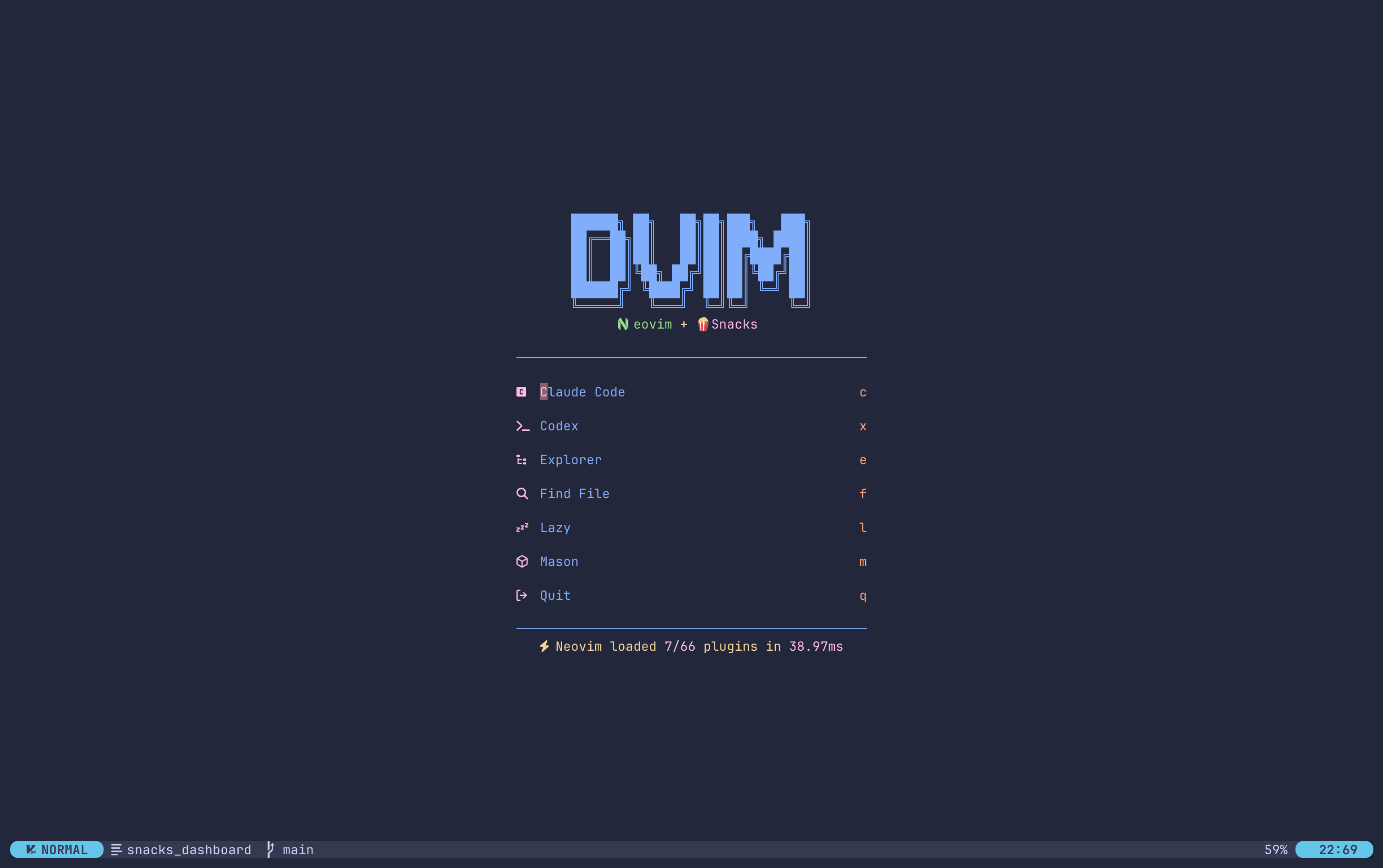
A quick tour of dvim
Every plugin has its own file under lua/plugin/, and lazy.nvim imports them automatically. To add or remove a plugin, I add or delete one file.
init.lua            entry point
lua/
  core/             lazy bootstrap, options, global keymaps
  plugin/           one file per plugin spec
  config/           larger configs (snacks modules, blink.cmp menu)
  util/             icons, mason helpers
snippets/           LuaSnip snippets
dvim supports the languages I use for web development, systems programming and configuration, including TypeScript, Python, Go, Rust and Nix.
snacks.nvim does a lot of the work
snacks.nvim handles much of the editor's interface, from the dashboard and file explorer to search and notifications. Having those features in one place gives me a consistent UI.
The picker is what I use most. Its smart file finder ranks recent and open files first, and the same interface lets me search file contents, Git history and even my command history.
I also customized the dashboard with my own header, shortcuts for what I open most, and the startup time at the bottom.
My favorite part is something I wrote myself: the dashboard comes back when I close the last file buffer, so I land somewhere useful instead of an empty [No Name] buffer.
I really enjoyed working on it. Getting it right meant handling tab pages, cleaning up leftover empty buffers and skipping terminals and help windows,
and it made a big difference in how Neovim feels day to day.
The smaller modules add up too. bigfile turns off heavy features when I open a huge file, and scratch gives me a throwaway buffer for notes.
Each one is a line in my config instead of another plugin to install and keep updated.
Theme
I use the Macchiato flavor of Catppuccin. It's dark enough for late nights, but soft enough that it doesn't feel harsh.
What I like most is that it has a port for almost everything. My terminal, tmux and Neovim all share the same colors, so switching between them doesn't feel like switching apps. It also themes the plugins I use in dvim.
Statusline
I use lualine.nvim for the statusline at the bottom of the editor. I gave each mode its own color from the Catppuccin palette and added the information I wanted at a glance, like the current branch and active language servers.
While setting it up I noticed the lsp_status component showed the same language server more than once.
I dug into the code, fixed it, and the fix was merged into lualine.
It was a small change, but it felt great to give something back to a plugin I use every day.
Color previews
nvim-highlight-colors shows a preview of every color in my code, from hex and rgb() to CSS variables and Tailwind classes.
The original plugin became inactive, so I forked it, and now I maintain it myself.
Since then I've fixed bugs and added the features I wanted, like updated Tailwind colors, Hyprland color formats and tests that run in CI.
Completion and editing
blink.cmp handles completion and LuaSnip handles snippets. The mini.nvim modules handle everyday edits like adding surrounding quotes, aligning text and moving lines. flash.nvim lets me jump anywhere on screen with a couple of keys.
LSP, formatting and linting
mason.nvim installs the language tools. In dvim, the servers it installs are enabled automatically, so adding a language is mostly a one-line change. conform.nvim runs the formatters and nvim-lint runs the linters.
nvim-lspconfig provides ready-made server configs, so I don't have to specify how each one starts. I only override what I care about, like which file types Tailwind runs in and Lua settings for editing Neovim itself.
Git
gitsigns.nvim shows changes and blame inline, and deltaview.nvim shows diffs through delta.
For everything else there's lazygit, a terminal UI for Git, and it's one of my favorite tools. A shortcut opens it in a floating window on top of Neovim. I can stage individual lines, rebase or resolve conflicts without leaving the editor. Things I used to look up git flags for are now muscle memory.
AI
I run AI coding agents right inside Neovim, so I don't need a separate AI editor. claudecode.nvim connects Claude Code to Neovim the same way the official VS Code extension does. It opens in a split on the right, sees my current file and selection, and shows its edits as diffs I can accept or deny with a key. codex.nvim opens Codex in a side panel.
Making them feel native took some tweaking: terminals that redraw at the right size after switching windows, red and green diff colors for the old and new side, and focus that jumps back to the agent after a diff closes.
Optimizing startup time
With more than 60 plugins, I still wanted Neovim to open instantly. lazy.nvim lets me load most plugins when I use a shortcut, run a command or open a file that needs them. Only a handful, like snacks.nvim and the theme, load right away.
To find what was slow, I used :Lazy profile and the startup section on my dashboard, which shows how long startup took and how many plugins loaded.
Picking the right trigger for each plugin took some trial and error. Load a plugin too late and it breaks: blink.cmp had to load on CmdlineEnter
so completion works in the command line before a file is open, and the mini.nvim editing plugins needed to load for new files too.
Using dvim
You need Neovim 0.12 or newer. Clone it into your config directory:
git clone https://github.com/davychhouk/dvim ~/.config/nvimThe first time you open Neovim, lazy.nvim installs the plugins and Tree-sitter parsers, and Mason installs the language tools. The README lists the required tools and every plugin.
I also use it as a Nix flake input in my dotfiles:
inputs.dvim.url = "github:davychhouk/dvim";Final thoughts
Looking back, every editor taught me something about what I want from my tools: speed, useful defaults and room to make them my own. Neovim brought all of that together in a tool I can understand and change.
Writing my own config taught me more than I expected. I learned Lua, how Neovim and its plugins work under the hood, and how to read other people's code to figure out why something breaks. It also got me contributing to open source, from a bug fix merged into lualine to maintaining my own fork of nvim-highlight-colors.
Today my editor feels like home. It starts fast, looks the way I like, and does what I need. When something bothers me, I know where to look and how to fix it. That's what made writing my own config worth it.
I'll keep maintaining dvim as my workflow changes, and I'm looking forward to working on more plugins. If you've been thinking about writing your own config, give it a try. Start small, and you'll be surprised how much you learn along the way.